Black Friday: our lowest prices of the year, now until Monday 30 November. Ends in
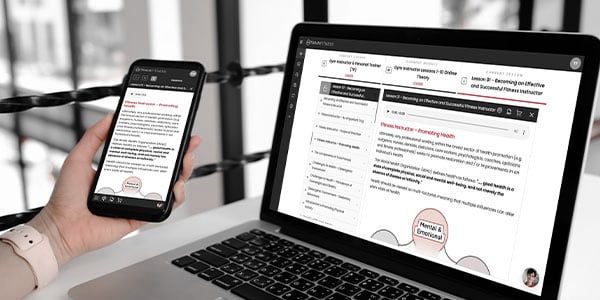
Get Started Every TRAINFITNESS course is studied on the Student Desktop™. It’s where you read and listen to your lessons, complete your worksheets and theory exams, book your assessments and keep track of your progress. This month, we’ve released a completely new version, built from the ground up and available on the web and in the TRAINFITNESS app for Android and iPhone.
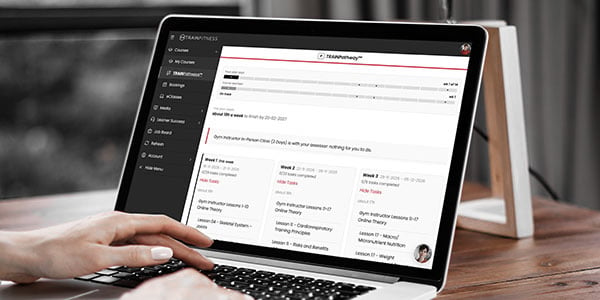
It also brings TRAINPathways™, a personal study plan built for you by TAIT™, The AI Tutor. Here’s everything that’s new.
We’ve rebuilt the Student Desktop™ from the ground up on the latest technology, and it’s now live. We’ve worked hard to create a super-slick learning experience which includes:
You sign in just as you do now. Go to train.fitness/login and choose Student Desktop™, or download the app from Google Play or the App Store.
So you’ve enrolled on a course but you’re not sure how long it’s going to take to complete. TAIT™ can help. Just let TAIT™ know when you’d like to finish your course, or how long you want to take. TAIT™ will build you a personal TRAINPathways™ study plan with dates, broken down week by week. TAIT™ will let you know what you need to have completed by when, and track your progress, even through your LAP assignments, clinics and assessments.
Not sure what’s realistic? Ask TAIT™ “How long will my course take?” It will show you the typical finish date and the latest date you can finish. Tell it how many hours a week you can study, and it will work out when that gets you to the end.
Once your plan is set, TAIT™ keeps you on track. Just ask:
TAIT™ will also tell you when it’s time to book a clinic or an assessment. If life gets in the way, ask TAIT™ to change your plan and it will show you the new dates before anything changes.
To open TAIT™, click the TAIT™ bubble in the bottom right corner of any screen, or open the menu and find TAIT™ under Learner Success (the menu is at the top on a desktop and at the bottom on your phone). Then say “Help me plan my course” and TAIT™ will take it from there.
Not sure where something is, or what a message on screen means? Ask TAIT™. It knows the Student Desktop™ inside out. Try “How do I raise a help desk query?” or “Where do I find the exercise library?”
TAIT™ knows what you’re studying and where you’re up to, so the answers are about you and your course. Try “Where am I up to?” or “When is the next clinic available?” If you’re on more than one course, TAIT™ will ask which one you mean.
TAIT™ can tell you about your assessments and eClasses, and how to book a place. Just ask TAIT™ to book you an eClass or book your clinic. TAIT™ can also cancel your booking, provided your booking is more than 14 days away.
If TAIT™ can’t sort something out, it can raise a help desk ticket for you with the details already filled in and our team will pick it up from there.
Want to test your knowledge on any subject in your course? Just ask TAIT™. For example, say “Quiz me on muscles” and TAIT™ will ask you a series of questions about muscles, then point you to the relevant part of your course content.
Ask TAIT™ to teach you a topic, for example “Teach me the components of total fitness.” Instead of handing you the answer, TAIT™ takes a Socratic approach, asking you questions and building on what you already know, so the topic sticks. If you get stuck, say “I don’t know” and you’ll get a hint.
This feature is in beta, which means we’re still improving it. It won’t always get things right yet, so if something doesn’t look right, tell TAIT™ or raise a help desk query. Your feedback helps us make it better.
The TRAINFITNESS app is now on Android and iPhone. It’s the same, new Student Desktop™, giving you consistency in look and feel.
This is just the start, and there’s plenty more on its way.
If you’re already studying with us, there’s nothing to set up. Go to train.fitness/login, choose Student Desktop™ and sign in as normal, or download the app from Google Play or the App Store. Then open TAIT™ and say “Help me plan my course”.
If you’re thinking about studying with us, this is where you’ll learn, with TAIT™ and our team beside you from your first lesson to your final assessment.